If you’ve never used AI before, this guide will get you started in less than five minutes. No jargon, no hype—just the practical basics.
What Actually Is AI?
AI (Artificial Intelligence) is software that’s been trained on vast amounts of text to predict helpful responses to your questions. Think of it as autocomplete on steroids—not a person, not magic, just a very sophisticated prediction engine that can write, summarize, analyze, and answer questions.
For novelists, it’s like having a tireless research assistant and thinking partner available 24/7.
Which Platform Should You Use?
There are three main AI platforms. They typically require you to create an account, but make it easy to do so via Google, Facebook or Apple. If you don’t have accounts with any of them, just create an account, using your email address. All have free tiers and paid tiers that start at $20/month but start with the free tier and only upgrade if you need to additional speed / capacity.
Claude (by Anthropic)
Best for: Long documents, nuanced writing tasks, uploading entire chapters. This is the platform I use most for work on my novel.
Start here: claude.ai
Gemini (by Google)
Best for: Integration with Google tools. I use this most for deep research into particular topics
Start here: gemini.google.com
ChatGPT (by OpenAI)
Best for: General use, most popular platform
Start here: chatgpt.com
Copilot (by Microsoft)
Best for: integration with Microsoft tools (e.g. Word, Outlook)
My recommendation: Start with the free version of Claude or Gemini. You’ll know when you need to upgrade (you’ll hit message limits or want advanced features). Most fiction writers can accomplish a lot on the free tiers.
The Absolute Basics: Your First 5 Minutes
The Interface
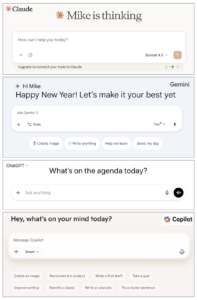
When you open an AI platform, you’ll see a simple text box—just like a messaging app. Type your question or instruction, press Enter (or click Send), and the AI will come back with its response.
Starting Fresh
Click “New chat” or “New conversation” whenever you want to start a completely separate task. Each chat is independent – don’t assume the AI will remember what you discussed in other chats unless you explicitly tell it at the start of the new chat.
The Fundamental Interaction
It’s a conversation. You type something, the AI responds, then you can respond back. You can ask follow-up questions, request changes, or go deeper into a topic. You’re not limited to one exchange.
Uploading Files
Look for the paperclip or attachment icon (usually near the text box). You can upload:
- Chapter drafts (Word docs, PDFs, text files)
- Character notes
- Research materials
- Images
The AI can read and reference these documents in your conversation.
Three Warm-Up Questions to Try Right Now
Don’t overthink your first attempts. Just try these:
- Research question: “I’m writing a scene set in Victorian London. What are three sensory details about the smells and sounds of a street market I should know?”
- Concept explainer: “Explain quantum entanglement in terms a regular person could understand.” (Or substitute any complex topic relevant to your novel)
- Writing feedback: “Here’s a paragraph from my novel: [paste paragraph]. What emotional tone is coming across to you as a reader?”
These simple questions will help you get comfortable with the basic interaction.
Essential Controls You Need to Know
New Chat = Fresh Start
The AI only remembers what’s in the current conversation. Start a new chat for each separate project or task.
Edit Your Message
Made a typo? Want to rephrase? Click on your message to edit and resubmit it. The AI will respond to your revised version.
Regenerate Response
Don’t like the AI’s answer? Look for “Regenerate” or the circular arrow icon to get a different response to the same prompt.
Copy Button
Every AI response has a copy button. Use it to grab text and paste it into your notes or writing software.
Conversation History
Your past chats are saved in a sidebar (usually on the left). You can return to them anytime.
The One Critical Rule
AI is your research assistant and thinking partner—NOT your ghostwriter.
You do the actual writing. Always.
Use AI to:
- Research historical details, scientific concepts, or cultural practices
- Brainstorm plot possibilities or character motivations
- Check consistency between chapters
- Analyze the emotional tone of your scenes
- Interview your characters (seriously—this works)
Don’t use AI to:
- Write your prose for you
- Generate entire scenes or chapters
- Replace your creative judgment
- Make decisions about your story
Your First Real Task
Try this right now:
Type into the AI: “I’m writing a character who is [brief description]. Ask me 10 questions that will help me develop their backstory.”
Then answer the questions it asks. You’ll be surprised how this simple exercise helps you think through your character in new ways.
Want to Go Deeper?
This guide covers the absolute basics—enough to get you started today. Once you’re comfortable with these fundamentals, you might want to explore more sophisticated techniques.
I’ve written about how I use “super-prompts” to create detailed character backstories and maintain consistency across my novel. You can read about that approach on my Substack if you want to take your AI skills to the next level.
But for now: just open one of those platforms and try those three warm-up questions. You’ll figure out the rest as you go.